
API Extraction
ABCProxy provides API extraction functionality, allowing you to easily obtain proxy IP lists and integrate them into your tools and scripts. 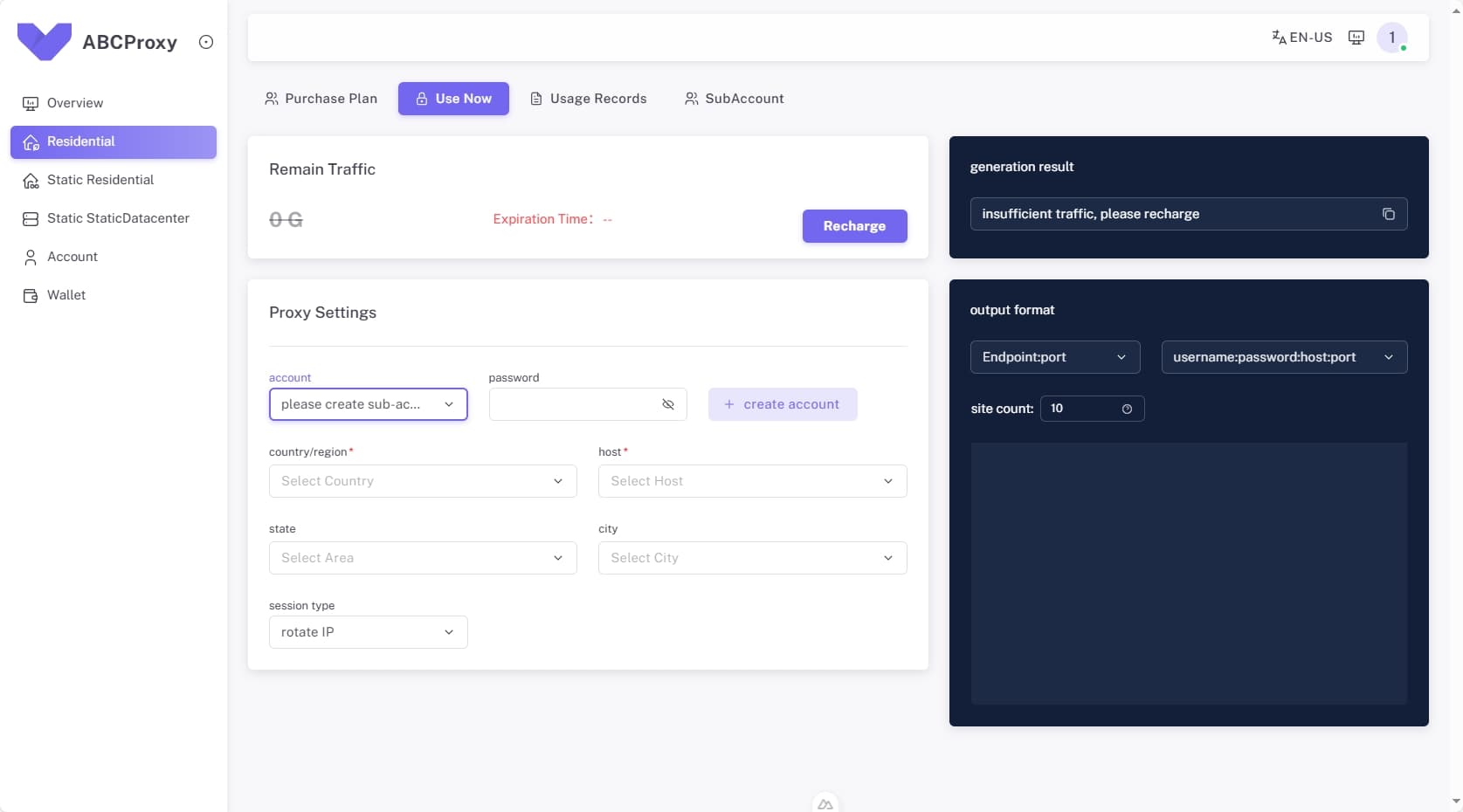
Prerequisites
Before using the API extraction feature, please ensure:
- Active Main Account - Your main account must be active and valid
- Active Residential Proxy Package - You must have an activated residential proxy traffic package
Usage Steps
Step 1: Navigate to Endpoint Generator
- Log into the ABCProxy console
- Navigate to "Residential Proxies" → "Endpoint Generator" page
- If no sub-account exists, click "Create Sub-account" to add a new sub-account
- Select the sub-account you want to use
Step 2: Configure Extraction Parameters
On the proxy extraction page, you need to configure the following parameters:
Region and Host Selection
- Country/Region: Select target country (e.g., United States, United Kingdom, Germany, etc.)
- State/City: Optionally select specific state or city
- Host Type: Select residential proxy host
Session Type
- Dynamic Session: Use different IP for each request
- Fixed Session: Maintain the same IP for a specified period
- Long Session: Maintain the same IP for extended periods
Quantity Settings
- Set the number of proxy IPs to extract
- Choose between batch extraction or single extraction
Step 3: Generate Proxy List
After configuration, in the right panel:
Generation Format Selection
The right panel provides multiple generation formats:
- Standard Format:
ip:port - With Authentication:
username:password@ip:port - HTTP Format:
http://ip:port - SOCKS5 Format:
socks5://ip:port
Verify IP Authenticity
The right panel generates a curl command above to verify the authenticity of extracted IP addresses:
bash
curl -x "http://username:password@ip:port" https://api.ipify.orgCopy IP List
Click the "Copy" button in the right panel to get the formatted proxy IP list.
Examples
API Request Example
bash
# Get US residential proxies
curl -X GET "https://api.abcproxy.com/v1/proxies" \
  -H "Authorization: Bearer YOUR_API_KEY" \
  -d '{
    "country": "US",
    "state": "California",
    "city": "Los Angeles",
    "session_type": "dynamic",
    "quantity": 10,
    "format": "standard"
  }'
Response Example
json
{
  "success": true,
  "data": {
    "proxies": [
      "192.168.1.1:8080",
      "192.168.1.2:8080",
      "192.168.1.3:8080"
    ],
    "total": 10,
    "session_id": "abc123def456"
  }
}
Important Notes
- Ensure your account has sufficient traffic balance
- The number of extracted IPs cannot exceed your traffic limit
- It's recommended to regularly verify IP validity and geolocation
- For technical support, contact: support@abcproxy.com